Field app
Punch in on arrival, Punch out on the way out, the day's jobs underneath.
Your crew's iPhone app. Three screens here: the punch, the month schedule and the job sheet.
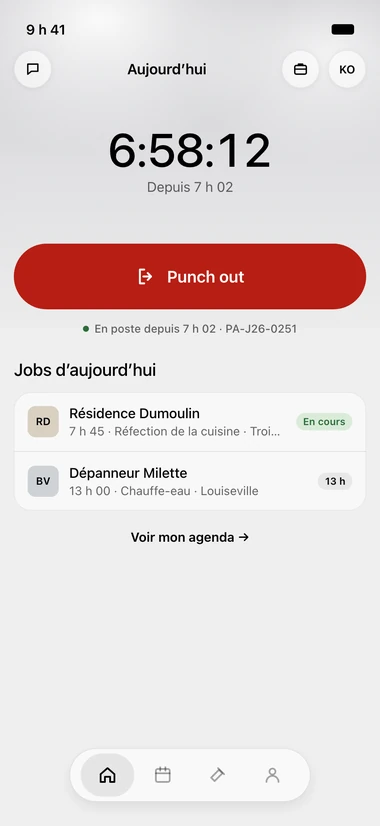
Punch in, Punch out
The same large button changes: Punch in on arrival, Punch out in red on the way out. Above it, the shift counter and the start time.
The day's jobs, underneath
Under the button, the day's jobs: the time, the client, the work, the town. The one running carries an in-progress tag.
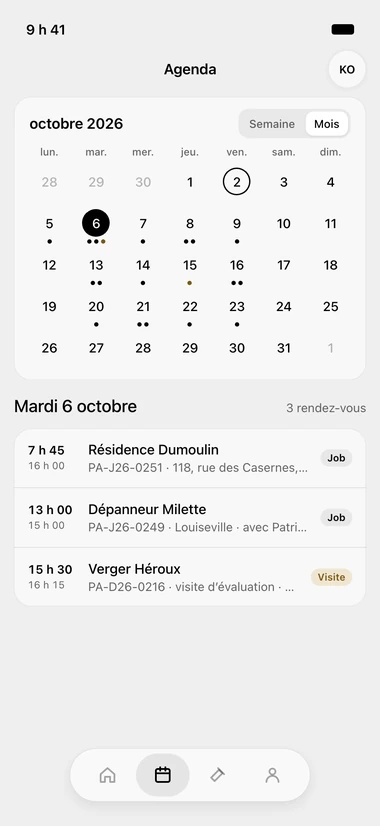
The schedule: week or month
Busy days carry one dot per appointment. Tap a day and its appointments open underneath, with start, end, client and address.
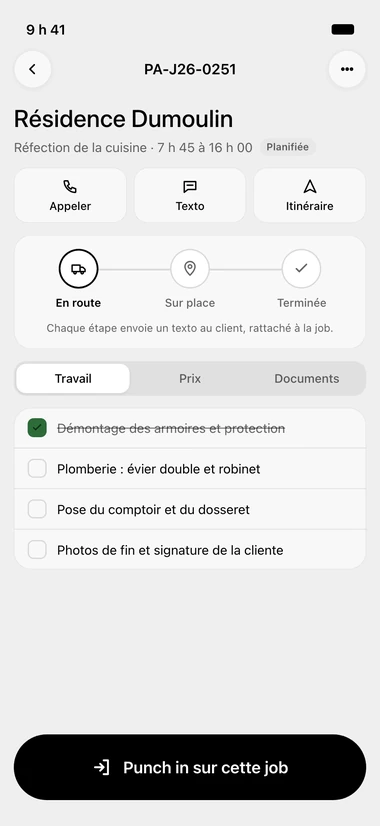
Call, text, directions
At the top of the sheet: call, text, directions. Underneath, the on-the-way, on-site and done band, then three tabs — work, pricing, documents.
Punch in on this job
Tasks get checked off one by one, and a finished one is struck through. At the bottom, a black button punches in on that job.


Questions we get asked
- Is there a break button?
- No. Punch in on arrival, Punch out on the way out. The Today screen has no break row.
- Can my employees see my prices?
- The pricing tab on the job sheet follows the employee's permissions.
- Does my client know when my worker leaves?
- Yes. When your worker taps on the way, on site or done, a text goes out to the client, attached to the job.
Try it for 30 days.
$127 a month for up to 5 employees, in Canadian dollars plus tax. Card required, nothing charged for 30 days, cancel any time.