

Scheduling
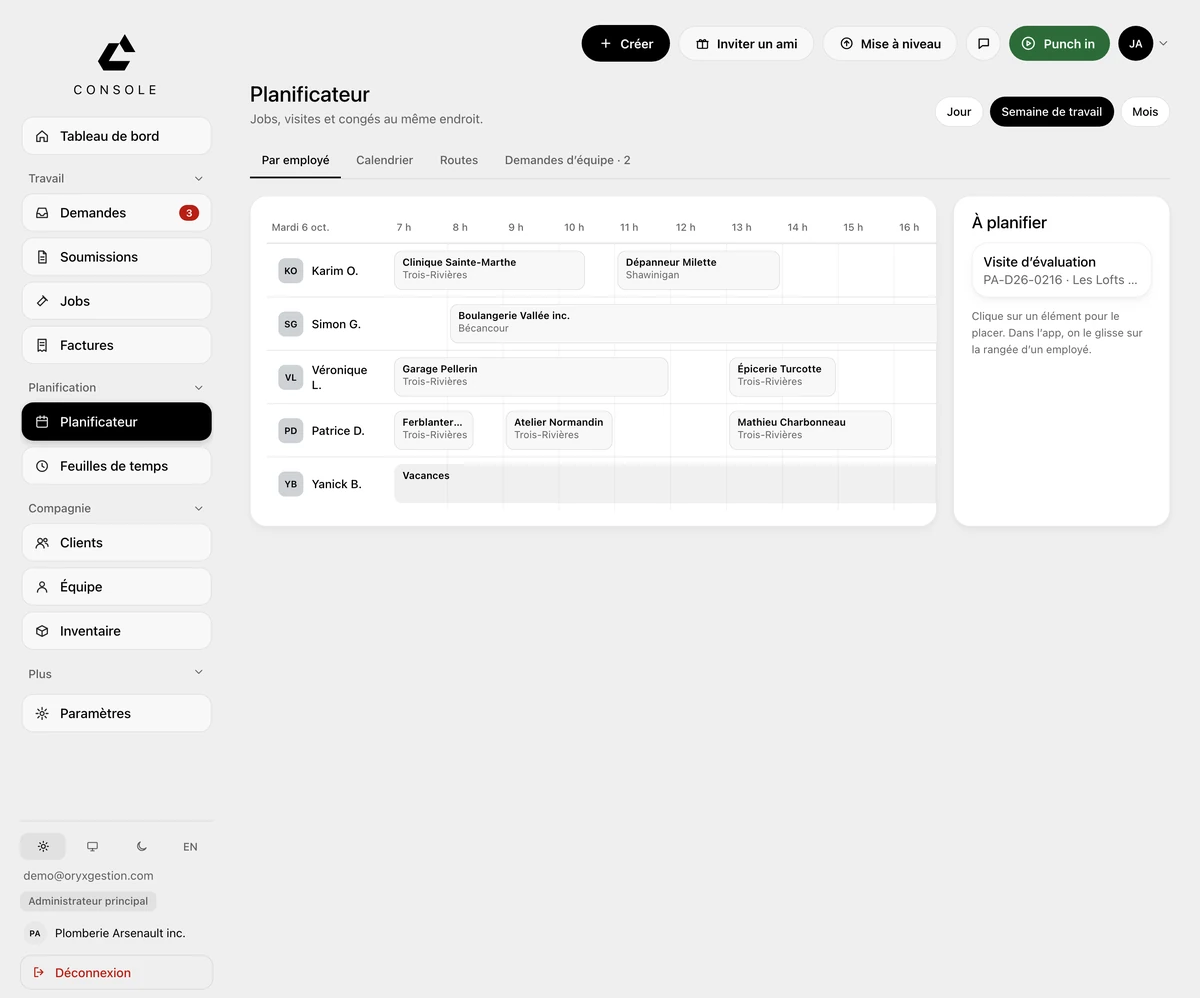
One row per technician
Everyone's week on a single line, one column per day. Each block shows the hours and the client's name. Jobs created from heat-wave calls wait in the “To schedule” tray under the grid.
More about SchedulingHVAC contractors
From the frozen heat pump to the invoice for the replacement. The client, the address and your technicians' hours stay in one place.
30-day free trial, no credit card
Your day
Your techs are in four towns, the schedule is on a whiteboard, the last call is sitting in a text message. At night, hours get rebuilt from memory on the hood of the truck, and the week's invoices wait in a spreadsheet.
What ORYX changes
Scheduling
Everyone's week on a single line, one column per day. Each block shows the hours and the client's name. Jobs created from heat-wave calls wait in the “To schedule” tray under the grid.
More about SchedulingRequests
The client, the job address and the on-site contact are on the request. On a service call, the button says Create job: no quote needed for a heat pump that won't start.
More about RequestsField app
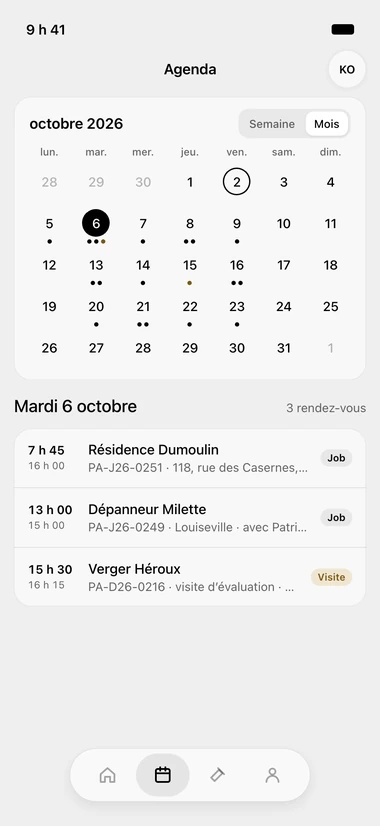
Your technician sees their days ahead of time: a dot per appointment, then the time, the client and the address. On the job sheet, Call, Text, Directions. On the way sends the client a text.
More about Field appInvoicing
On a finished job, the button says Invoice. The job's lines are already there, with GST, QST and net 30 terms. You click Send to client; they get a Pay online button.
More about InvoicingWhat ORYX doesn’t do
ORYX doesn't manage recurring maintenance contracts and has no parts catalogue or supplier pricing. For that, you need a specialized tool. ORYX handles the request, the quote, the job, the hours and the invoice.
Questions we get asked
Yes. The deposit at signing shows in the quote email, and the document carries both the deposit and the balance at the end of the work; your client signs from their phone.
Each technician taps Punch in on arrival and Punch out when they leave, on their iPhone, and every entry carries its job. On Friday, you approve the week and export payroll to Excel or CSV.
Yes. You start with the new jobs, the old ones finish in your old system; your clients come over from an Acomba, Sage 50 or Excel file, and your 30 minutes of setup are included during the trial.
Free trial, no card
30 days to try it on your real jobs. Your email, a password, the code we send you, and you’re in.
30-day free trial, no credit card
No commitment
Cancel any time from your console, and take your data out.
30 minutes of setup, included
We set up your account with you, on the phone, during the trial.
Your clients imported
An Acomba, Sage 50 or Excel file, and your list is in the tool.
Support from the founder
The founder answers himself, by email or on the phone.