
Weekly timesheet in Excel Free timesheet template (Excel and PDF)
In short
Download a weekly timesheet in Excel, with formulas, or as a printable PDF: one line per job, start time, end time, unpaid break and the hours for each day, in hours and minutes and in decimal hours.
The Excel file adds up the week and separates the hours over 40, the standard work week for most employees in Quebec according to the CNESST. Construction work governed by Act R-20 follows its collective agreement.
Download the timesheet
Two formats, same columns. The files contain fictional examples only.
The Excel file has two tabs: the blank sheet, and a filled-in fictional example (Plomberie Exemple inc.).
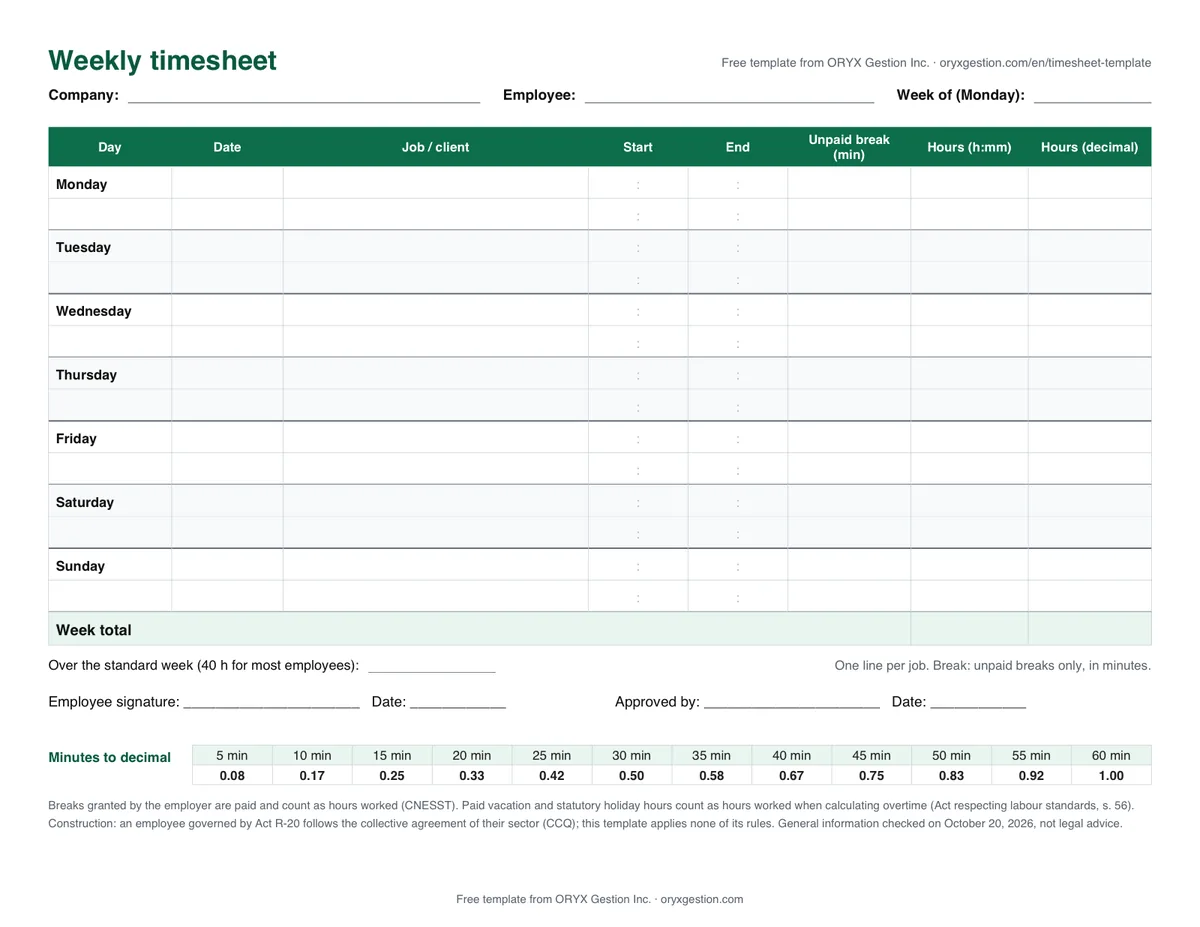
What the template contains
| Column | What you enter | What the file calculates |
|---|---|---|
| Date | Nothing: it fills in from the Monday of the week | Monday, then one more day per row |
| Job / client | The job or client the employee worked for | — |
| Start and End | Times as on a clock: 7:00, 15:30 | — |
| Unpaid break | The minutes of break that are not paid | — |
| Hours (h:mm) | — | End − start − break, even when the shift runs past midnight |
| Hours (decimal) | — | The same hours in hundredths: 8 h 15 min = 8.25 |
| Regular hours | — | Up to the standard week (40 h by default), in line order |
| Over the standard week | — | The hours above that threshold |
Two lines per day: one per job. The cells to fill in are pale yellow.
How to fill in the timesheet
- Enter the company name, the employee's name and the date of the Monday of the week. The dates of the seven days fill in on their own.
- For each job, write the start and end times as on a clock (7:00, 15:30), then the unpaid break in minutes. Paid breaks are not entered: they count as hours.
- Leave days off blank. A week with a statutory holiday or paid vacation? Enter those hours in the "Paid vacation and holidays" cell: they count when calculating the hours over 40.
- At the end of the week, the employee signs and you approve. Keep the sheet with your records.
What the employer must record
In Quebec, an employer must establish a registration system or keep a register for each employee (Regulation respecting a registration system or the keeping of a register, s. 1). The timesheet supplies the hours; the rest comes from payroll and the employee's file.
| The register must show | In this timesheet |
|---|---|
| The employee's full name | Yes (Employee) |
| The number of hours of work per day | Yes |
| The total number of hours of work per week | Yes |
| The number of days of work per week | Yes (Excel: days worked) |
| Overtime hours paid or compensated by time off, with the applicable premium | In part: the hours over the standard week, without the premium |
| Residence, social insurance number, employment and start date | No: the employee's file |
| Wage rate, premiums, gross wages, deductions, net wages and payment date | No: payroll |
| Vacation, statutory holidays and days off taken | No: record them separately |
| Date of birth of an employee under 18 | No: the employee's file |
Summary of section 1 of Regulation N-1.1, r. 6. The full text (tips, reference year, pay period…) is in the sources below.
The registration system or register for a given year must be kept for 3 years (section 2 of the same regulation). This template is not a complete register: it is the "hours" part.
Hours over 40
The standard work week is 40 hours for most workers (CNESST). Hours worked beyond it are overtime, paid with a 50% increase in the regular hourly wage (Act respecting labour standards, s. 52 and 55).
Some employees have a different standard week, for example 47 hours in logging operations or sawmills. Others are not entitled to the premium, such as managers or farm workers. Change the "Standard week" cell of the Excel file if needed.
Paid vacation and statutory holiday hours are considered hours worked for this calculation (s. 56). The template therefore takes them off the threshold: with an 8-hour holiday, overtime starts after 32 hours on the clock.
The template counts hours. It does not calculate pay or the premium.
What about construction?
The Act respecting labour standards does not apply to an employee governed by Act R-20 on the construction industry, except for certain standards it lists (s. 3). Their hours and overtime follow the collective agreement of their sector: industrial, institutional and commercial, residential, or civil engineering and roads (CCQ).
This template applies no CCQ rule. For these employees, use it only to record hours, and check the rest in the collective agreement of the sector.
Calculating hours without Excel?
The calculator adds up a week and converts minutes to decimal hours, right in your browser.
Official sources
- Standard work week (opens in a new tab)CNESST: 40 hours for most workers, and the exceptions
- Overtime (opens in a new tab)CNESST: 50% premium, vacation and statutory holidays, excluded workers
- Wage register (opens in a new tab)CNESST: definition
- Regulation respecting a registration system or the keeping of a register (opens in a new tab)Légis Québec: N-1.1, r. 6, sections 1 and 2
- Act respecting labour standards (opens in a new tab)Légis Québec: sections 3, 52, 55 and 56
- Collective agreements in the construction industry (opens in a new tab)Commission de la construction du Québec (CCQ): the four sectors
Frequently asked questions
For each line: end − start − unpaid break. Add up the week in hours and minutes, then convert to decimal hours (minutes ÷ 60) if your payroll asks for it. The Excel file does it on its own.
The registration system or register for a given year must be kept for 3 years (Regulation respecting a registration system or the keeping of a register, s. 2). Hours per day and the weekly total are part of it.
For most employees, beyond 40 hours a week (CNESST). Overtime is paid with a 50% premium. Some sectors have a different threshold, and construction work governed by Act R-20 follows its collective agreement.
It can be used to record hours. But an employee governed by Act R-20 follows the collective agreement of their sector for hours and overtime: this template applies none of its rules.
Yes. If the end time is earlier than the start time, the Excel file counts into the next day: from 22:00 to 6:00, 8 h. An end time equal to the start time, or a break longer than the shift, shows "Check".
ORYX Console
Punch in, punch out: two buttons replace the timesheet.
The management software from ORYX Gestion Inc., built in Quebec for service businesses:
- Punch in and punch out on iPhone, with a shift timer
- GPS status on every time entry, with the location taken at Punch in and Punch out only
- Payroll export in Excel or CSV, regular and overtime hours separated